This is now deprecated and under maintenance for existing users only - no new customers can sign up for the platform plan
- booking URL to manage where people land after booking after one of your users.
- reschedule URL to your page for rescheduling a booking.
- cancel URL to your page for cancelling a booking.
This guide will explain each of the URLs and how to create page for each of them using atoms and our hooks.
Booking URL
After a person books one of your users, that person should see the successful booking.
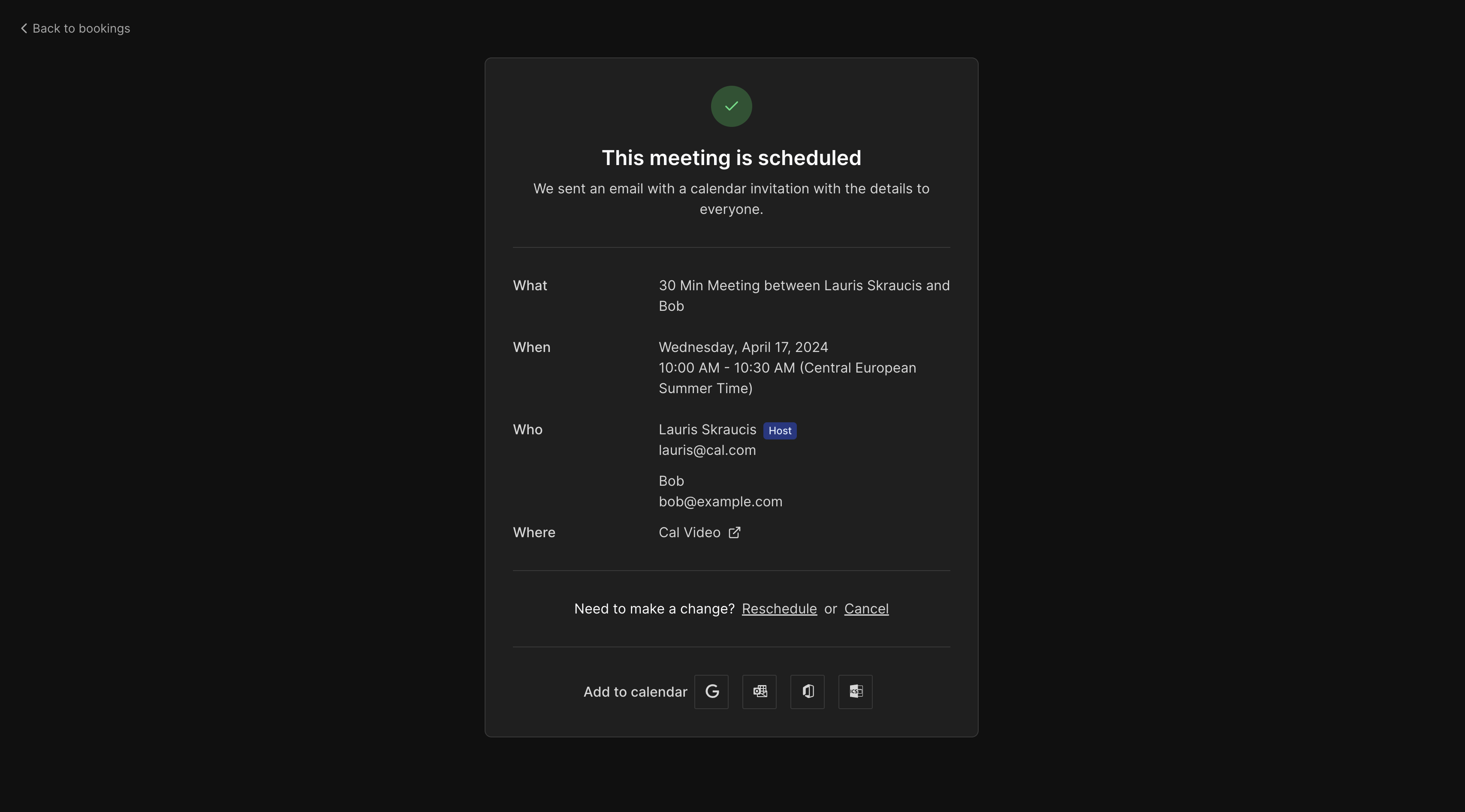 Page in the booking URL will take URL parameter provided by us and then hook to fetch the booking and then display it. Here is an example:
- Pass
my-app.com/bookings as the redirectURI.
- In your app, create
my-app.com/bookings/[bookingUid] page where bookingUid will become path parameter.
- When a booking occurs, booker will be re-directed to the redirectURI with booking UID as the bookingUid parameter aka my-app.com/bookings/[bookingUid].
- In the my-app.com/bookings/[bookingUid] route create a page that imports
useBooking hook, then extract bookingUid from URL parameter, and uses the hook to display booking information. Because
useBooking hook can return individual booking or an array of recurring bookings, you need to handle single booking and array of bookings cases separately:
import { useBooking } from "@calcom/atoms";

export default function Bookings(props: { calUsername: string; calEmail: string }) {
    const router = useRouter();

    const { isLoading, data: booking, refetch } = useBooking((router.query.bookingUid as string) ?? "");

    return (
        <>
          {!Array.isArray(booking) ? (
              <p>{booking.title}</p>
          ) : (
              booking.map((recurrence) => <p key={recurrence.id}>{recurrence.title}</p>)
          )}
        </>
    )
};
Reschedule URL
- Pass
my-app.com/bookings/reschedule as the redirectURI.
- When “Reschedule” is clicked, user will be re-directed to the redirectURI with rescheduled and eventTypeSlug query parameters
my-app.com/reschedule?rescheduleUid=buiaE8jHmNAxLrqitahCeL&eventTypeSlug=thirty-minutes
- In the my-app.com/reschedule route create a page that extracts
rescheduleUid and eventTypeSlug from the query parameters and passes the to the Booker atom:
const rescheduleUid = (router.query.rescheduleUid as string) ?? "";
const eventTypeSlugQueryParam = (router.query.eventTypeSlug as string) ?? "";

<Booker
    rescheduleUid={rescheduleUid}
    eventSlug={eventTypeSlugQueryParam}
    username={calUsername}
/>
Cancel URL
- Pass
my-app.com/bookings/cancel as the cancelURI.
- In your app, create
my-app.com/bookings/cancel/[bookingUid] page where bookingUid will become path parameter.
- In the page of my-app.com/cancel/[bookingUid] import useCancelBooking from atoms and get access to the cancel mutation
import from “@calcom/atoms”;
const { mutate: cancelBooking } = useCancelBooking({
    onSuccess: () => {
      refetch();
    },
});
- Create a cancel button that invokes mutation returned by the “useCancelBooking”. You have to pass id of the booking which you can get by fetching booking using “useBooking” hook by uid from the query params. Provide a suitable “cancellationReason”.
Because
useBooking hook can return individual booking or an array of recurring bookings, you need to handle single booking and array of bookings cases separately:
import { useBooking, useCancelBooking } from "@calcom/atoms";

...
const { isLoading, data: booking, refetch } = useBooking((router.query.bookingUid as string) ?? "");
const { mutate: cancelBooking } = useCancelBooking({
    onSuccess: () => {
      refetch();
    },
  });
...
   return !Array.isArray(booking) ? (
    <button
      className="underline"
      onClick={() => {
        cancelBooking({
          id: booking.id,
          cancellationReason: "User request",
        });
      }}
    >
      Cancel
    </button>
  ) : (
    <>
      {booking.map((recurrence) => (
        <button
          key={recurrence.id}
          className="underline"
          onClick={() => {
            cancelBooking({
              id: recurrence.id,
              cancellationReason: "User request",
            });
          }}
        >
          Cancel
        </button>
      ))}
    </>
  );

